Klondike Solitaire — Play Draw 1 or Draw 3
Play classic Klondike—the game most people mean by Solitaire—online with Draw 1 or Draw 3 rules. The game starts in your browser with no download or account required, and includes Undo, hints, score tracking, numbered deals, verified-winnable deals, and a daily challenge. You can also explore Spider Solitaire, FreeCell, and Mahjong Solitaire across the site.
Challenge Friends with a Numbered Solitaire Deal
Every new game on this page has its own deal number and permanent challenge link. Share the link and another player receives the same shuffled deck, starting layout, and Draw 1 or Draw 3 setting. You can also replay a deal yourself to test a different strategy without creating an account. Choose Winnable deal from the New Game menu for a deal with a verified solution, or inspect the construction and complete solution certificate in the Solitaire Deal Lab.
A verified-winnable deal has at least one solution; it does not mean every move will lead to a win. The Deal Lab shows the exact starting cards and a step-by-step solution you can check. Ordinary random deals are not checked for solvability. The daily challenge gives players the same deal for that date, so you can compare approaches using the same cards.
Types of Solitaire
While Klondike (the classic solitaire you play here) is the most well-known version, there are numerous variations of this game:
- Spider Solitaire uses two decks and completes whole same-suit runs.
- FreeCell deals every card face up and provides four storage cells.
- Mahjong Solitaire removes free matching tiles from a layered layout.
- Pyramid pairs uncovered cards totaling 13 and removes Kings by themselves.
- Yukon lets a face-up card carry every card below it, even when the packet is unordered.
Compare all 19 games by their movement rules in the game collection. For variations on this board, try Double Klondike's two decks or Canfield's reserve and changing foundation rank.
Klondike Solitaire: Draw-1 vs Draw-3 Modes
This version offers two common Klondike draw rules. You can switch between them using the control above the game board.
Draw-1 Klondike (Easy Mode)
In Draw-1 mode, you turn over one card at a time from the stock pile. This makes the game more accessible for beginners and is a practical place to learn how the tableau, stock, waste, and foundations work.
Draw-3 Klondike
Draw 3 solitaire is the traditional and more challenging version of Klondike solitaire. In this mode, you draw three cards at a time from the stock pile, but can only play the top card. This makes access to the waste pile more restrictive, so the order in which you play cards matters more.
Both modes follow the same basic rules but offer different levels of difficulty. In Draw 3, playing the top waste card exposes the card beneath it; you cannot pick a covered waste card directly. When the stock runs out, click its empty space to turn the waste back over. This version allows repeated passes through the stock.
Rules of Classic Solitaire
Initial Setup
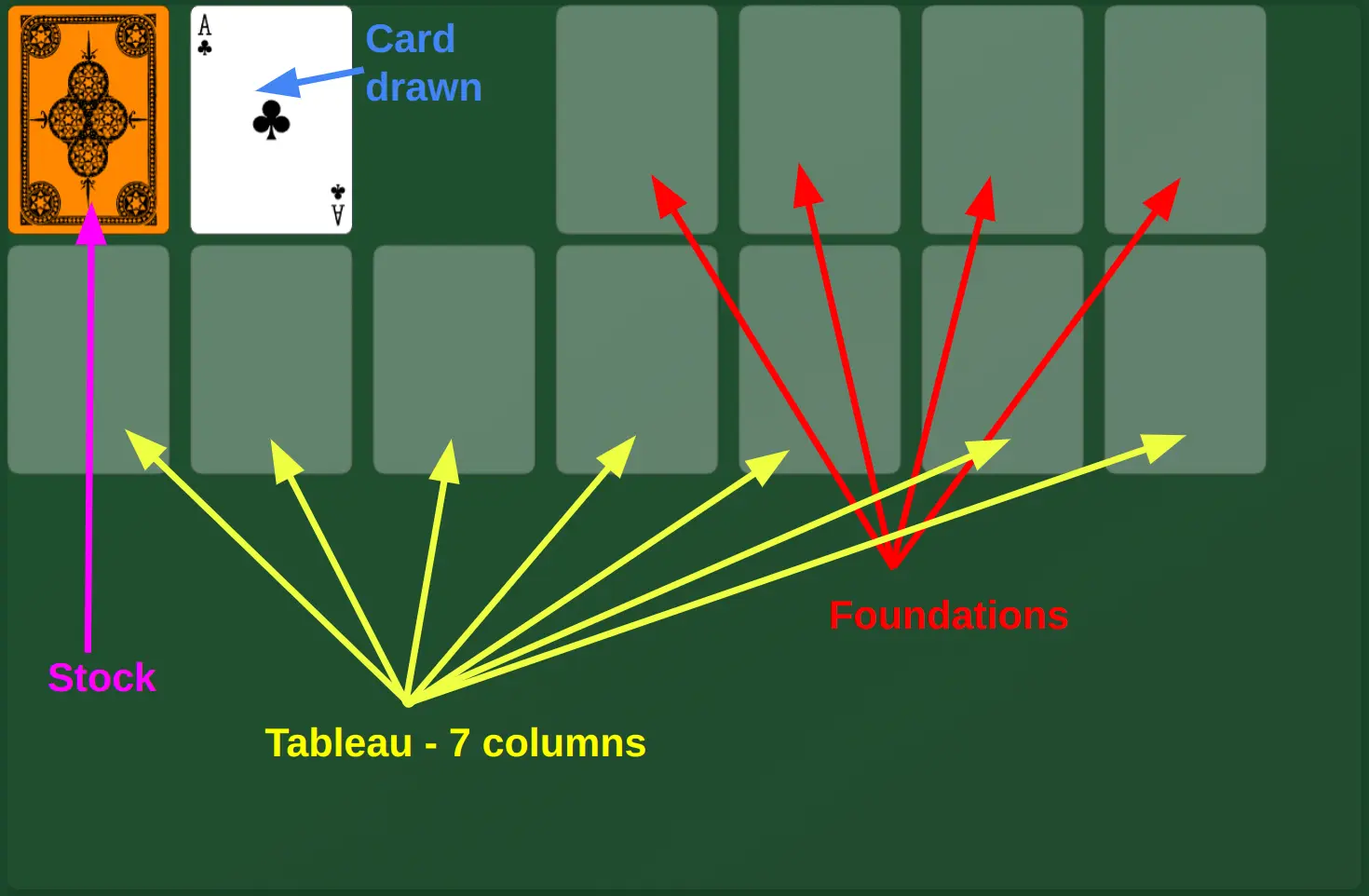
Solitaire begins with a standard deck of 52 cards. The cards are dealt into a characteristic pattern with seven columns, where the first column has one card, the second two, and so on up to the seventh column which contains seven cards. In each column, only the top card is face up. The remaining cards form the draw pile.
Moving Cards
Cards on the tableau are arranged in descending order with alternating colors. For example, you can place a black nine on a red ten. Only kings can be moved to empty spaces. In the foundations, cards are stacked by suit, starting from ace to king.
A move that reveals a hidden card
Suppose a face-down card is covered by a Queen of Clubs, Jack of Hearts, and 10 of Spades. Move that face-up sequence onto an exposed King of Diamonds: the colors alternate, the ranks descend by one, and the hidden card turns over. A King of Clubs would reject the black Queen. If the packet ended in a 9 instead of a 10, the full packet would not move because its ranks are out of order.
Before clearing a column, find a King that can use the empty space. A lower card cannot fill it. Compare Yukon's unordered packet example to see how a related game changes the sequence rule.
When an empty column helps
Suppose you can move a lone red 6 onto a black 7, leaving an empty column. If a King is available, you can move it into that space and free the cards beneath it. Without an available King, the empty column cannot hold a Queen or any lower card. Check what the space will let you do before clearing it; uncovering a hidden card elsewhere may be more useful.
Tips for Beginners
If you're just starting to play solitaire, here are some useful tips:
- Always check all available moves before drawing a new card from the deck
- Try to reveal as many hidden cards in the initial columns as possible
- Before clearing a column, identify a King or King-led sequence that can use it
- Keep track of cards you'll need later
- Use the undo function to learn from your mistakes
Choose a move with the controls
- Drag a card or ordered sequence to choose its destination. Pick up the highest card in the sequence you want to move.
- Click or tap a playable card to try an automatic move. The game tries a foundation before a tableau column; drag when the destination matters.
- Click the stock to draw cards, or its empty space to recycle the waste.
- Undo reverses a move and its score change. Use it to compare two lines of play.
- Hint highlights a legal action. It does not solve the deal or promise the best move.
- New Game opens the random, winnable, replay, numbered-deal, and daily-challenge options.
Scoring in this version
| Action | Score change |
|---|---|
| Move a card to a foundation | +5 |
| Move a card from waste to tableau | +3 |
| Move a card from a foundation back to tableau | −2 |
| Other moves, drawing, recycling, and revealing a card | 0 |
There is no time bonus or time penalty. Undo reverses the score change of the undone move.
How to Play Solitaire (Video Tutorial)
Frequently Asked Questions
Is the game free?
Yes, our game is completely free and you can play it unlimited times, with no hidden costs or registration required.
Can I play on mobile?
Yes, the game is optimized for all devices - mobile phones, tablets, and computers. The interface automatically adjusts to your screen size.
Do I need to download anything to play?
No, this is a completely web-based game. No downloads or installations required - just open the page and start playing solitaire online.
How are points calculated?
Moving a card to a foundation gives +5 points; waste to tableau gives +3; foundation back to tableau costs 2. Other moves have no score change. There is no time bonus or penalty, and Undo reverses the move's score change.
Can I undo a move?
Yes, one of the advantages of our game is the ability to undo moves. This allows you to try different strategies and learn from your mistakes.
Is it possible to win every game?
Ordinary random deals can be unsolvable. Choose Winnable deal in the New Game menu for a starting position with a verified solution. Even then, a wrong choice can block your route; use Undo or replay the deal to try another line.
Keyboard controls
Tab enters or leaves the board. Left/Right chooses a pile; Up/Down chooses a card in that pile. Home/End goes to its first/last card. Enter or Space selects a card or sequence; choose a destination and press again to move. Escape cancels. H: hint; Ctrl/Cmd+Z: undo. Activate the stock to draw.
Built and maintained by Marin Kišić
Transparent deals, tested rules, no account required
Deal claims you can inspect
Random shuffles are labelled random. Verified-winnable deals include a complete 52-card solution certificate.
Open the Deal LabRules covered by automated tests
Core movement, scoring, seeded deals, game statistics, and winnable-deal invariants are checked before release.
Read the game rulesPlay without an account
The game runs in your browser. Progress and preferences stay on your device, and permanent challenge links contain only deal settings.
Read the privacy policyIndependent browser-game site · Technical and content review updated August 2026 · About the creator · About the project · Send feedback